Choose parts to build your own car and race it on the 9 tracks of an island. The car moves forward on its own, so just sliding a finger left and right gets you to the finish.
Getting started
- Open itJust open it in the browser. Nothing to install and no account to create.
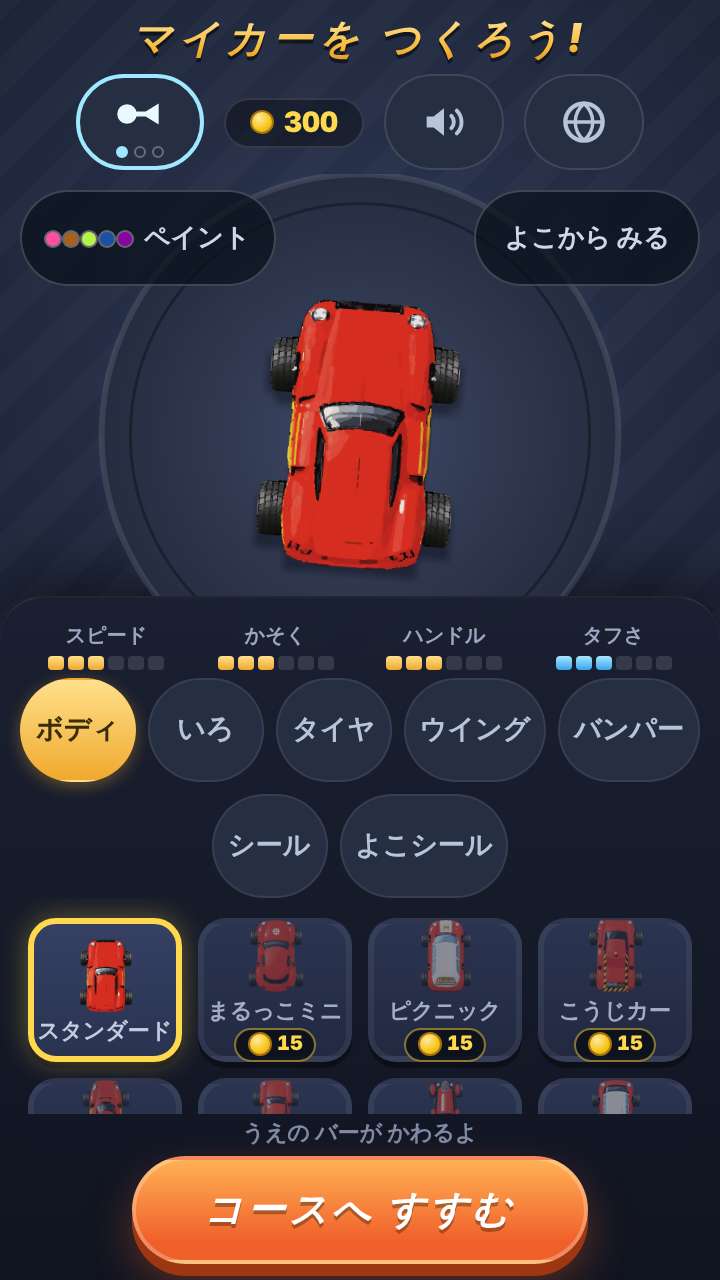
- Build a carIn the garage, choose the body, color, tires, wing and decals. The parts available from the start are enough to make a car.
- Race the tracksChoose a track on the map and race. Finishing a track opens the next one.
What is on the screen
During a race, the screen is just the road seen from above and your car. The only numbers are the laps left and the time - nothing else to read. In the garage the car is also shown side-on, so decals on the side can be seen.
What fingers do
Put a finger on the screen and slide left or right to steer that way. There are no buttons. Hitting a wall or going off the road does not stop the car - it only slows down. Coins collected while racing unlock new parts.
What is inside
- 9 tracks (each with its own features, such as hills, a loop and places where you leave the road)
- 17 bodies / 8 colors
- 13 tires / 13 wings
- 17 decals / 7 side decals
- Course maker (lay road pieces on a grid to make your own road and race it straight away; it appears on the map once you finish any track)
What this game does not have
- Ads and purchasesNothing to tap by mistake that takes you to another site.
- Input fieldsNo name or email address is asked for, and there is no account to create.
- Game overThere is no point where you get stuck and cannot go on. Children can stop whenever they have had enough.
Before you start
- Best times and built cars are saved automaticallyThey stay only on this device. They cannot be carried over to another device.
- A trophy for the top 3But it is not needed to go on. Finishing a track opens the next one, whatever your place.
- Languages14 languages (Japanese, English, Chinese, Traditional Chinese, Korean, Spanish, French, German, Portuguese, Indonesian, Italian, Turkish, Polish, Romanian). At first it opens in the language of the device.
Playing without a connection (on a plane, in the car)
Games two people can play on one device
Things to make together on the weekend
Other games for a similar age
Every game is on the Kids Games home page.